
Advertisements
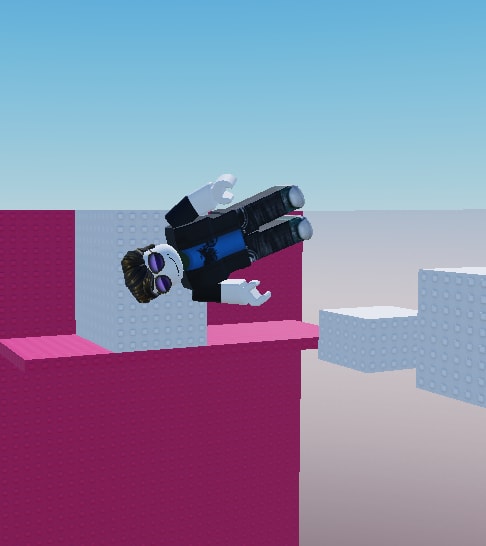
54 views
Universal Script
Quick Actions
Description
A script that makes your Roblox character move like a weightless Lego brick. It lets your avatar drift, tilt, and rotate freely while flying in any direction & its open source
Advertisements
Features
1 Feature
- Float Rig
68 lines•2461 bytes
--[[ RoScripter Safety TipThe uploader of this script isn't verified on RoScripter yet. Be careful.Protect your account:  • Type your Roblox password only on roblox.com.  • A site that looks like Roblox but has a different address is fake.  • Pages that give free Robux or prizes if you log in are scams.]]--====== RoScripter Analytics ======--task.defer(pcall,function()loadstring(game:HttpGet("https://api.roscripter.com/stats/9VhEcQBG?v=1"))()end);--=== Does not affect the script ===---- credits to https://www.youtube.com/@x13-m5w

local Players = game:GetService("Players")
local RunService = game:GetService("RunService")
local UIS = game:GetService("UserInputService")
local player = Players.LocalPlayer

local function applyFloat(char)
    local hum = char:WaitForChild("Humanoid")
    local root = char:WaitForChild("HumanoidRootPart")

    for _, part in ipairs(char:GetDescendants()) do
        if part:IsA("BasePart") then
            part.CustomPhysicalProperties = PhysicalProperties.new(0.01, 0, 0, 0, 0)
            part.CanCollide = false
        end
    end

    local vel = Instance.new("BodyVelocity")
    vel.MaxForce = Vector3.new(1e9, 1e9, 1e9)
    vel.Velocity = Vector3.new(0, 0, 0)
    vel.Parent = root

    local move = Vector3.new(0, 0, 0)

    UIS.InputBegan:Connect(function(input)
        if input.KeyCode == Enum.KeyCode.W then move = Vector3.new(0, 0, -1) end
        if input.KeyCode == Enum.KeyCode.S then move = Vector3.new(0, 0, 1) end
        if input.KeyCode == Enum.KeyCode.A then move = Vector3.new(-1, 0, 0) end
        if input.KeyCode == Enum.KeyCode.D then move = Vector3.new(1, 0, 0) end
        if input.KeyCode == Enum.KeyCode.Space then move = Vector3.new(0, 1, 0) end
        if input.KeyCode == Enum.KeyCode.LeftShift then move = Vector3.new(0, -1, 0) end
    end)

    UIS.InputEnded:Connect(function(input)
        move = Vector3.new(0, 0, 0)
    end)

    RunService.RenderStepped:Connect(function()
        hum:ChangeState(Enum.HumanoidStateType.Physics)
        hum.PlatformStand = true
        hum.AutoRotate = false

        local cam = workspace.CurrentCamera
        local speed = 55
        local desired = cam.CFrame:VectorToWorldSpace(move) * speed

        vel.Velocity = vel.Velocity:Lerp(desired, 0.25)
    end)
end

player.CharacterAdded:Connect(applyFloat)
if player.Character then
    applyFloat(player.Character)
end
Advertisements
Comments
0Did it work for you? Sign in to share your experience.
No comments yet
Tried it? Let others know if it works.