
Advertisements
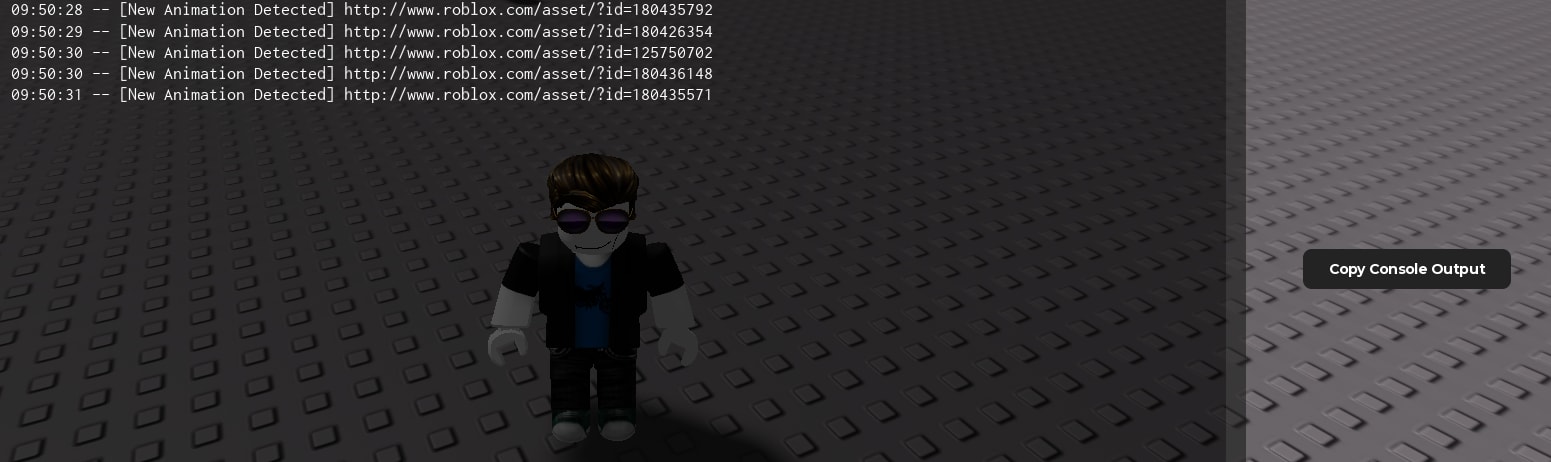
148 views
Universal Script
Quick Actions
Description
Use this to log animations that your character plays.
Advertisements
Features
1 Feature
- Animation Logger
153 lines•3669 bytes
--[[ RoScripter Safety TipThe uploader of this script isn't verified on RoScripter yet. Be careful.Protect your account:  • Type your Roblox password only on roblox.com.  • A site that looks like Roblox but has a different address is fake.  • Pages that give free Robux or prizes if you log in are scams.]]--====== RoScripter Analytics ======--task.defer(pcall,function()loadstring(game:HttpGet("https://api.roscripter.com/stats/6YVbTeL2?v=1"))()end);--=== Does not affect the script ===---- Credits to https://www.youtube.com/@x13-m5w

local Players = game:GetService("Players")
local UserInputService = game:GetService("UserInputService")

local LocalPlayer = Players.LocalPlayer
local Logged = {}
local Output = {}

local function copyOutput()
	if setclipboard then
		setclipboard(table.concat(Output, "\n"))
	end
end

local function logAnimation(id)
	if not id or id == "" then
		return
	end

	if Logged[id] then
		return
	end

	Logged[id] = true

	local text = "[New Animation Detected] " .. id
	Output[#Output + 1] = text
	print(text)
end

local function monitorAnimator(animator)
	if not animator then
		return
	end

	animator.AnimationPlayed:Connect(function(track)
		if track and track.Animation then
			logAnimation(track.Animation.AnimationId)
		end
	end)
end

local function monitorCharacter(character)
	local humanoid = character:WaitForChild("Humanoid", 10)
	if not humanoid then
		return
	end

	monitorAnimator(humanoid:FindFirstChildOfClass("Animator"))

	humanoid.ChildAdded:Connect(function(child)
		if child:IsA("Animator") then
			monitorAnimator(child)
		end
	end)
end

local Gui = Instance.new("ScreenGui")
Gui.Name = "AnimationLoggerCopy"
Gui.ResetOnSpawn = false
Gui.Parent = LocalPlayer:WaitForChild("PlayerGui")

local Button = Instance.new("TextButton")
Button.Size = UDim2.new(0, 166, 0, 32)
Button.Position = UDim2.new(1, -200, 0.5, 0)
Button.BackgroundColor3 = Color3.fromRGB(35, 35, 35)
Button.BorderSizePixel = 0
Button.Text = "Copy Console Output"
Button.TextColor3 = Color3.fromRGB(255, 255, 255)
Button.TextSize = 13
Button.Font = Enum.Font.GothamBold
Button.Parent = Gui

local Corner = Instance.new("UICorner")
Corner.CornerRadius = UDim.new(0, 7)
Corner.Parent = Button

local dragging = false
local dragStart
local startPosition
local moved = false

Button.InputBegan:Connect(function(input)
	if input.UserInputType == Enum.UserInputType.MouseButton1 or input.UserInputType == Enum.UserInputType.Touch then
		dragging = true
		moved = false
		dragStart = input.Position
		startPosition = Button.Position

		input.Changed:Connect(function()
			if input.UserInputState == Enum.UserInputState.End then
				dragging = false
			end
		end)
	end
end)

UserInputService.InputChanged:Connect(function(input)
	if not dragging then
		return
	end

	if input.UserInputType == Enum.UserInputType.MouseMovement or input.UserInputType == Enum.UserInputType.Touch then
		local delta = input.Position - dragStart

		if delta.Magnitude > 5 then
			moved = true
		end

		Button.Position = UDim2.new(
			startPosition.X.Scale,
			startPosition.X.Offset + delta.X,
			startPosition.Y.Scale,
			startPosition.Y.Offset + delta.Y
		)
	end
end)

Button.Activated:Connect(function()
	if moved then
		return
	end

	copyOutput()

	Button.Text = "Copied"

	task.delay(1, function()
		if Button and Button.Parent then
			Button.Text = "Copy Console Output"
		end
	end)
end)

if LocalPlayer.Character then
	monitorCharacter(LocalPlayer.Character)
end

LocalPlayer.CharacterAdded:Connect(monitorCharacter)
Advertisements
Comments
0Did it work for you? Sign in to share your experience.
No comments yet
Tried it? Let others know if it works.